
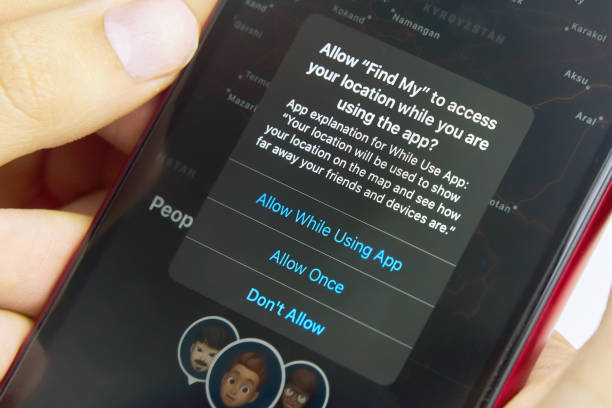
The Permission Prompt Nobody Reads
Smartphone app permissions — the prompts that ask for access to location, microphone, camera, contacts, and other device capabilities — appear at moments of app installation or first use when the user’s primary interest is getting the app working rather than carefully evaluating data access decisions. The ‘Allow’ tap that follows in under a second is a consequential data access decision made without adequate consideration, and the permissions accumulate across dozens of installed apps into a picture of device access that most users would find surprising if they examined it.
Understanding what each permission category actually enables — not at the level of ‘this allows location access’ but at the level of ‘this allows the app to know where you are at all times and correlate that with other app data’ — transforms permission decisions from rote acceptance into informed data access choices. The review of existing permissions (covered in the Smartphones section of Vol. 9) and the informed evaluation of new permission requests together constitute the permission management practice that protects privacy without preventing useful app functionality.
Location: The Permission With the Widest Implications
Location permission is the most consequential because location data, over time, reveals more than any other single data type: where you live (the location you return to each evening), where you work (the location you’re at during business hours), where you go for healthcare (visits to specific medical facilities), your religious practice (visits to places of worship), your relationships (locations you share with specific other people over time), and your political activities (locations of political events, meetings, protests). This inference capability is why location data is commercially valuable beyond its obvious applications in navigation and weather.
The permission specificity that matters: ‘Always’ location access allows background location tracking even when the app isn’t open; ‘While Using App’ limits access to periods of active use; ‘Precise Location’ provides GPS-quality location data; ‘Approximate Location’ provides location within a few hundred metres or a city level. Navigation apps need precise location always during navigation; a weather app needs approximate location while being used; a flashlight app has no legitimate need for any location access. Applying this functionality test — does this app’s stated function require this level of location access? — to each location permission produces better decisions than accepting all requests.
Microphone, Camera, and Contacts: The Sensitive Trio
Microphone access allows an app to record audio when the permission is active. Persistent microphone access (the ‘Always’ equivalent for audio) has generated significant concern about continuous audio monitoring, and multiple studies have documented unexpected microphone activation in social media and advertising apps. In practice, current iOS and Android permission frameworks require user grant for microphone access and show an indicator when the microphone is active, limiting the most egregious surveillance concerns — but microphone access for apps that don’t clearly need it (games without voice features, utility apps) is worth denying.
Camera access allows the app to capture photos and video. The camera and microphone orange and green dots visible at the top of the iPhone screen when these sensors are active provide real-time awareness of when apps are using them. Contacts access provides the full contacts list — names, phone numbers, email addresses, and all stored contact information — for every person in the user’s address book. This is particularly sensitive because sharing contacts data shares other people’s information without their consent. Apps that claim to need contacts for genuinely useful purposes (messaging apps that identify which contacts use the same service) are legitimate; apps that request contacts for less clear purposes warrant scepticism.
Storage, Bluetooth, and Notification Permissions
Storage access (in older Android versions; newer versions have more granular media permissions) allows apps to read and write files on the device’s storage. On current Android, the distinction between photos/media access and all-files access matters: an app that needs to save photos to the gallery needs media access; one requesting access to all files has significantly broader access than most apps require. iOS handles this through specific media library access rather than general storage.
Bluetooth permission allows apps to detect nearby Bluetooth devices, which has location inference implications: a network of Bluetooth-enabled devices (including other phones, smart home devices, and retail beacons) can be used to infer location even without GPS location permission. Advertising networks have used Bluetooth data for location tracking in ways that circumvent GPS location restrictions. Apps with legitimate Bluetooth needs (connecting to headphones, speakers, fitness devices) deserve the permission; apps with no obvious Bluetooth use case don’t. Notification permissions, while not a data access permission, deserve deliberate evaluation: each notification permission granted creates ongoing attention claims from that app.
The Permission Audit Practice
A periodic permission audit — reviewing all granted permissions every 3-6 months and removing those that no longer seem necessary or appropriate — is more effective than careful evaluation at grant time because it catches permissions granted during installation when attention was elsewhere, permissions that apps have claimed but used for purposes not evident at grant time, and permissions for apps that are no longer actively used.
Both iOS (Settings > Privacy & Security) and Android (Settings > Privacy > Permission Manager) organise permissions by type, showing which apps have each permission. The apps with ‘Always On’ location access, the apps with microphone access, and the apps with contacts access are the three categories most worth reviewing first. An app that hasn’t been opened in 30 days that still has ‘Always On’ location access is providing ongoing location data to a service that the user isn’t actively using — a clear candidate for permission revocation or app uninstallation.